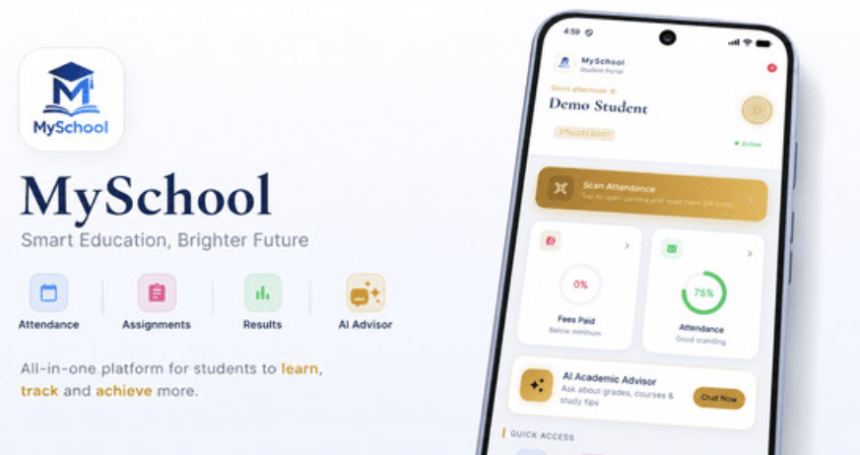
MySchool is a complete School Management System and Student Portal — a powerful Laravel web backend (admin panel) bundled together with a fully functional mobile app for students (built with Flutter, targeting Android & iOS). Run your entire institution from one modern platform: manage academics, finance, attendance, results and communication from the web dashboard, while students access everything they need from the mobile app.
Suitable For Any Type of School: MySchool is fully configurable, so it fits virtually any education provider — whether you run a nursery, kindergarten, pre-school, primary or elementary school, secondary or high school, college, vocational or technical institute, training center, university, or any other kind of school or institution. You define your own departments, programs, courses, sessions, fees and grading, so the system adapts to your structure instead of forcing you into a fixed model.
What’s Included:
Full Laravel backend source code (web admin panel + REST API for the app) Full Flutter mobile app source code (Android, iOS & desktop targets) Detailed step-by-step HTML documentation Free support and future updates Web Backend (Admin) Features:
Role-based access — Super Admin, Admin, Accountant, HOD, Registrar, Lecturer and Student, each with the right permissions Academic management — departments, programs, courses, academic sessions, timetables, course allocation and student registration Finance — flexible fee structures, invoices, payment history, receipts and statements Online payments — Stripe, Flutterwave, Paystack, PawaPay, DPO and Orange Money (optional) Grading & transcripts — record grades, auto-calculate GPA/CGPA, with an HOD grade-approval workflow Attendance — QR-code based check-in and per-course attendance reports Assignments, study materials, notices, discussion boards and student elections Online classes — Jitsi, Daily.co, Zoom, Google Meet, Microsoft Teams, Whereby and BigBlueButton (optional) SMS notifications — Africa’s Talking, Twilio and UGSMS (optional) AI Academic Assistant — optional AI chat for students (see the important note below) Branding — set your institution name, abbreviation, logo and currency; the app picks these up automatically Reports and Excel/PDF exports Mobile App (Student) Features:
Dashboard — GPA/CGPA summary, recent grades, fee balance and active notices at a glance Results & Grades — semester results, cumulative GPA and a downloadable transcript Fee Payment — fee structure, outstanding balance, full payment history and online payment Attendance — built-in QR-code scanner for fast class check-in, plus attendance summaries Timetable, Assignments & Homework, Study Materials Online Classes — see scheduled sessions and join with one tap Notices & Notifications, Discussion Board, Course Registration Elections / Voting — secure in-app student voting Student ID Card — digital ID with a scannable QR code AI Academic Assistant (optional) Dark & Light mode, remembered per device Multi-school ready — point the app at any MySchool backend URL Important — About the AI Academic Assistant: The AI Assistant is an OPTIONAL feature and is DISABLED by default. To enable it, the backend must be configured with an API key from a third-party AI provider — either Anthropic (Claude) or OpenAI (ChatGPT). These are external, PAID services billed by usage (per request/token) directly by the provider, and are NOT included with this item. You must create your own account with the provider and add your own billing/credits. Typical costs are small for normal use, but they are your responsibility and depend on usage. The entire system is 100% functional without the AI Assistant — if no key is configured, the AI feature simply shows a “not available” message and everything else works normally.
About Optional Third-Party Integrations: Online payment gateways, SMS gateways and online-class providers are also OPTIONAL. Each is provided by an external company, requires your own account, and may charge its own fees (for example, transaction fees, per-SMS charges or subscription plans). MySchool simply connects to whichever services you choose to enable — you only pay the providers you actually use. The core system runs fully without any of them.
Requirements:
Backend: PHP 8.2+, MySQL/MariaDB, Composer, Node.js (for building assets), and a web server (Apache or Nginx). Works on shared hosting/cPanel, VPS or cloud. Mobile app: Flutter 3.x (Dart 3.x) to build; Android 5.0 (API 21)+ or iOS 12+ to run. An internet connection. (Optional) Provider accounts/API keys for AI, payments, SMS or online classes if you enable those features. Getting Started:
Install the Laravel backend (upload files, set the .env, run migrations and seed the admin account) — full steps are in the documentation. Configure your institution settings: name, logo, currency, fees and any optional integrations. Open the Flutter app project, run flutter pub get, and (optionally) set your own app name, bundle ID and icon. On first launch, point the app at your backend URL and log in. Build and deploy a signed release for Android and/or iOS. Documentation & Support: Detailed HTML documentation is included covering installation, configuration and every integration. Need help? Contact us with your CodeCanyon purchase code and we’ll be glad to assist.



